
Have you ever looked down at your phone and felt a sudden jolt of panic? You are definitely not alone. Just a few days ago, one of our community members received a text message that is currently making the rounds, targeting seniors across the country.
It came from an unfamiliar number (+1 (904) 809-6430) and read:
"Your recent renewal is pending confirmation. View your status here: https://l.ze.io/subscription1"
Actual Smishing Message Received:
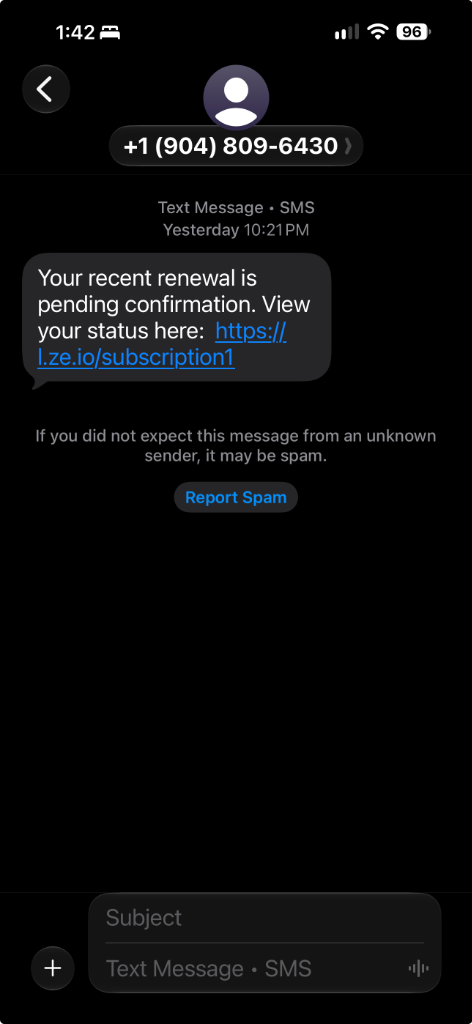
l.ze.io/subscription1). It is an active, confirmed scam address designed to steal credentials and compromise devices.
Take a close look at this message. At first glance, it might make you wonder: “Did I forget to renew something? Is my insurance, my phone service, or my favorite subscription about to be cut off?”
This is exactly what scammers want you to think. This is a scam tactic known as "Smishing" (SMS Phishing)—fraudulent text messages designed to trick you into clicking a harmful link or handing over your personal information.
If you or a loved one receive a message like this, here is a simple, 3-step action plan to take back control: Disconnect, Pause, and Verify.
Step 1: DISCONNECT — Break the Channel
Disconnecting simply means this: you never, ever walk through the door they opened for you. You don’t use their link, and you don’t dial their number.
Think about how these attacks usually land:
- The "Problem" SMS: You get a text claiming your bank flagged a $400 charge with a link to "verify"? Don’t tap it, and don’t reply.
- The Tech Alert: A red alert takes over your computer screen, warning that your hard drive is locked with an 800 number to call? Don’t dial that number.
- The Fake Caller: A live caller claims they’re with Medicare or Social Security? Hang up the phone.
The rule is simple: cut their line and use your own front door.
If you think there might actually be a problem with an account, ignore the text entirely. Instead:
- Use verified routes: Open your physical wallet, flip your credit or debit card over, and call the tiny customer service number stamped right into the plastic.
- Type it yourself: If you get a suspicious alert about Amazon or another service, open a brand-new browser tab, head to the official website yourself, and log in at your own pace.
When you choose the path yourself, you strip away their control—and you take back total authority.
Step 2: PAUSE — Kill the Urgency
Once you've disconnected and ignored their prompt, step two is where you break their spell: take a mandatory ten-minute pause.

Every scam on the planet relies on manufactured panic. They want your adrenaline pumping:
- "Your electricity will be shut off in twenty minutes."
- "A warrant will be issued if you don't respond right now."
- "Your bank account will be closed today."
⏰ The Golden Rule of Timing
Legitimate institutions do not run on countdown timers. Real life moves slowly. Real legal notices arrive by certified mail. Real banks take days to process disputes, not fifteen frantic minutes over text or phone.
The moment you feel your chest tighten or your heart speed up, treat that physical reaction as your personal smoke detector. It’s not telling you to hurry—it’s telling you to stop.
Put the phone down on the counter. Step away from the computer keyboard. Walk into the kitchen, pour a glass of water, or put the kettle on. Give yourself just ten minutes. You will be amazed at how obvious the scam looks once the adrenaline clears out and your common sense steps back in.
Step 3: VERIFY — Bring in Second Eyes
You’ve disconnected from their trap, you’ve paused to let the adrenaline settle, and now it’s time to confirm the facts before touching a dime.
The rule here is simple: never verify alone.

Make an ironclad pact with yourself and your household right now: anytime an alert involves moving money, buying gift cards, giving away passwords, or letting someone connect remotely to your screen, it requires a second set of eyes. It takes two people to say yes.
- If you’re a senior: Choose your "Tech Anchor" today. It could be an adult child, a grandchild, or a trusted neighbor who knows their way around a smartphone. When something looks strange, pick up the phone and say: "I got this alert, and I'm running my verification check. Take a look with me."
- If you’re an adult child or caregiver: Make it completely safe for your parents to call you. No sighs. No lectures. No making them feel silly for asking. Scammers rely on embarrassment to keep people silent. When an older adult feels afraid of being scolded, they try to handle it in secret—and that silence is what costs thousands of dollars.
Asking for a second opinion isn't a sign of weakness. In any high-stakes situation, pilots, doctors, and bank executives double-check their instruments. Verifying together is simply smart defense.
What to Do If You Already Clicked the Link
If you or someone you know clicked a suspicious link like the one in this screenshot, do not panic. Take these swift, protective steps immediately:
- Stop entering info: Close the browser window immediately. If you started typing a password or Social Security number, stop.
- Go offline: Temporarily put your phone on "Airplane Mode" or disconnect from Wi-Fi to stop any data from being sent or downloaded.
- Change your passwords: If you think your login details were compromised, go to the real, official website and change your password right away. If you reuse that password elsewhere, change it on those accounts too.
- Scan your device: Run a scan using trusted mobile antivirus software to ensure no malware was installed.
- Monitor and report: Watch your bank statements for any unusual activity. You can also report "smishing" scams to the FTC at ReportFraud.ftc.gov.
Share the Defense
You don’t need to be a computer genius to stay completely secure—you just need a system you can rely on:
Disconnect. Pause. Verify.
Share this 3-step guide with your friends, family, and neighbors. By talking openly about these messages, we take away the scammers' favorite weapon: secrecy. Stay safe, stay smart, and remember—you are in control!