
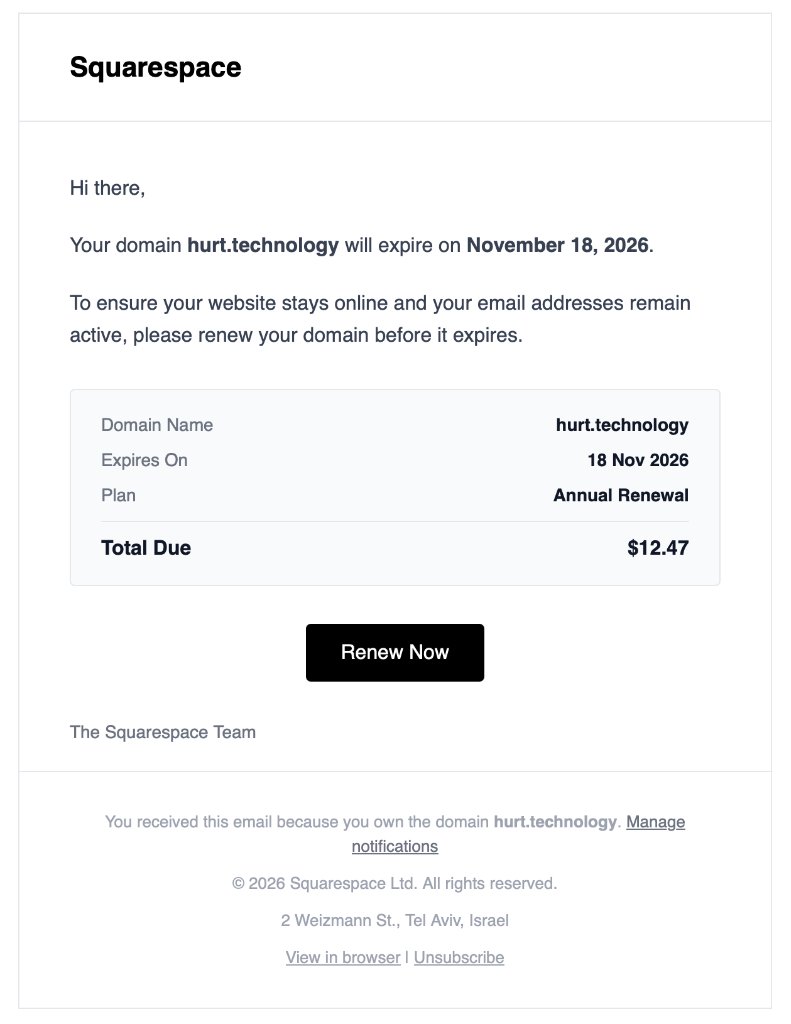
Imagine opening your morning email inbox and seeing a message with a familiar logo claiming that your website or online account will expire today. It gives you a clean invoice table, a small fee of $12.47, and a prominent black button that says "Renew Now."
Just a few days ago, this exact email landed right in my personal inbox. It pretended to be from Squarespace, claiming that the domain name hurt.technology was set to expire immediately on November 18, 2026, and warned that email addresses and websites would go offline without instant payment.
Actual Phishing Email Received:
Do NOT click any buttons or links, and do NOT contact any phone numbers or email addresses displayed in suspicious messages like this.
The email in the screenshot above is a confirmed fraudulent phishing attack. Even though it looks clean, uses official branding, and lists real domain details, every single button and link leads to a malicious page intended to steal credit cards or trap you into unwanted monthly subscriptions.
At first glance, it is easy to see why so many thoughtful, intelligent people fall for this trap. The fee is small ($12.47), the consequences sound serious ("website stays online and email remains active"), and the layout looks just like an authentic corporate notification.
Instead of tapping that button, I used our community's core defense rule: Disconnect, Pause, and Verify.
When I investigated where that "Renew Now" button actually led, the deception was astounding: it didn't even take me to renew my actual service! Instead, clicking the link redirected to an unauthorized third-party checkout page that attempted to trick me into paying for a completely different service subscription.
What is "Phishing" and How Does It Actually Work?
Phishing is a type of online scam where criminals impersonate trusted companies—such as banks, domain registrars, package couriers, utilities, Netflix, or government agencies—to trick you into taking urgent action.
Phishing works through four distinct stages:
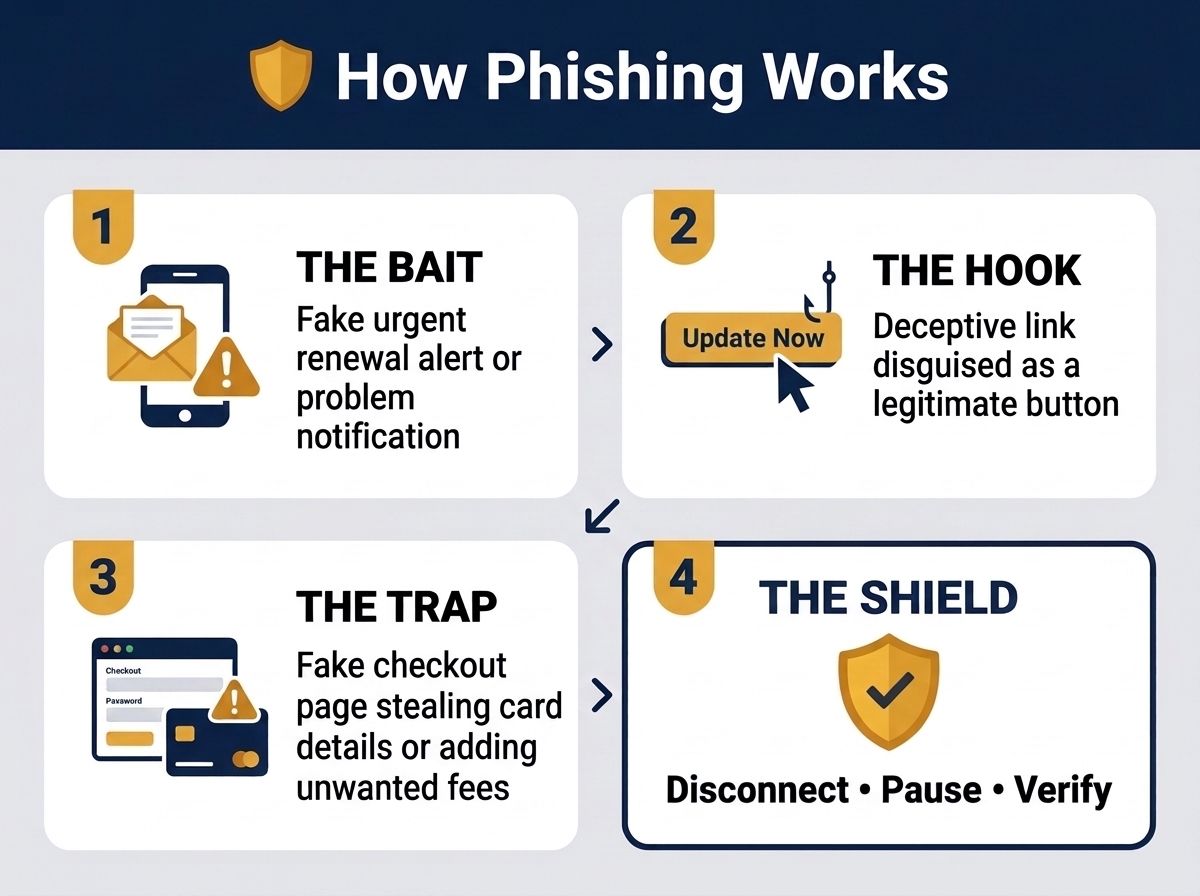
- The Bait (Manufactured Urgency): The scammer sends a realistic alert warning that something critical is expiring, locked, or past due today. They purposefully choose small, believable dollar amounts or urgent warnings to bypass your natural skepticism.
- The Hook (The Deceptive Link): The email contains a button or link that appears legitimate. But behind the scenes, the web address (URL) does not go to the real service—it redirects to an imposter site or an affiliate funnel.
- The Trap (The Fake Checkout or Credential Theft): Once you arrive at their site, they ask you to enter your credit card number, passwords, or personal details. In our example, the page secretly enrolled victims in a high-priced recurring service subscription that had nothing to do with domain renewals!
- The Ongoing Drain: Many victims never realize they were scammed until weeks later when mysterious recurring charges appear on their credit card statement every month.
The Staggering Cost: Phishing & Online Fraud By The Numbers
If you have ever received an email like this and wondered if anyone really falls for it, the official law enforcement data reveals a sobering reality: phishing is the single most common cybercrime in the world today.
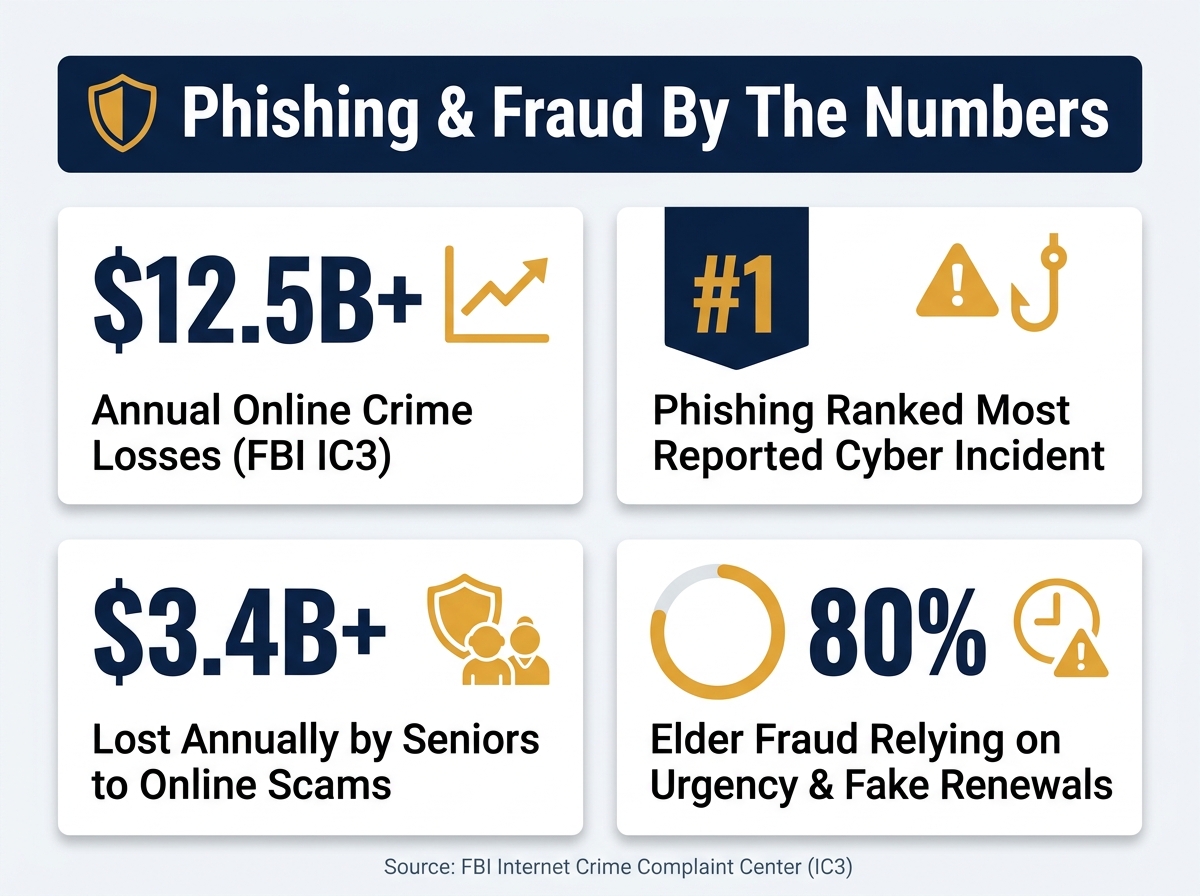
According to the FBI Internet Crime Complaint Center (IC3) and the Federal Trade Commission (FTC):
- $12.5+ Billion in Total Annual Losses: American consumers and businesses reported over $12.5 billion in losses to online fraud and cyber attacks in a single year.
- #1 Reported Cyber Threat: Phishing and spoofing scams are consistently the number one complaint filed with the FBI, with nearly 300,000 separate phishing incidents reported annually.
- $3.4+ Billion Lost by Older Adults: Seniors (ages 60 and older) suffer the heaviest financial impact of all age groups, losing over $3.4 billion annually to predatory online scams.
- Subscription Traps on the Rise: Deceptive billing and fake renewal notifications are among the fastest-growing complaint categories at the FTC, frequently trapping seniors in unauthorized monthly credit card charges.
How the 3 Steps Prevented This Scam Cold
When this email arrived, I didn't need to be a computer programmer to protect my wallet. I simply followed the exact three-step rhythm we teach:
Here is exactly how applying this formula made the scam completely harmless:
1. DISCONNECT — Never Walk Through Their Door
The golden rule of email safety is: never use the link or phone number the stranger handed you.
When the email demanded that I click "Renew Now," I disconnected. I didn't click the link. I didn't reply to the sender. If you don't step through the door they opened, they cannot take a single penny from you.
2. PAUSE — Kill the Manufactured Rush
The email warned that my domain would expire today. That creates an immediate physical adrenaline spike—the fear of having your website or emails go dark.
I paused. I took a deep breath and reminded myself: legitimate companies do not work on countdown timers. Real domain registrars send multiple reminders weeks in advance, and almost all legitimate services offer a 30-day grace period. Taking 5 minutes to calm down instantly broke their spell.
3. VERIFY — Open Your Own Front Door
Instead of clicking their button, I opened a completely fresh browser tab and manually typed the official website of my domain service. I logged in using my saved, secure password and looked at my actual dashboard.
The reality? The domain was already renewed, auto-renew was safely turned on, and no balance was owed. The email was 100% bogus.
When I later inspected the URL hidden inside that email button in a safe, isolated sandbox, it pointed directly to an aggressive billing trap for an unrelated subscription. If I had simply clicked and typed my card number, I would have been charged hundreds of dollars for a service I never requested.
What to Do If You Clicked a Suspicious Link
If you or a family member recently clicked a link in a similar email, don't feel ashamed—scammers spend millions making these messages look convincing. Take these protective steps immediately:
- Call Your Bank or Card Issuer: If you entered your credit or debit card details, call the phone number on the back of your card immediately. Report the unauthorized charge and request a new card with a new number.
- Change Your Passwords: If you typed your email address and password into the page, go directly to the real service website and change your password right away. If you reuse that password on other accounts, change those too.
- Check Your Bank Statements: Review your recent credit card and bank statements for small recurring charges like $9.99, $14.95, or $29.99. Scammers often start with tiny charges to test if you notice.
- Report the Incident: File a quick report at ReportFraud.ftc.gov and contact the DOJ National Elder Fraud Hotline at 1-833-372-8311.
Keep Scam Protection Right By Your Computer
Our printable Refrigerator Card gives you and your family an instant reminder of the 3-Step Defense Rule and the five golden rules of elder fraud prevention.
🖨️ View & Print Free Refrigerator CardShare This Alert With Family & Friends
Predatory scammers rely on secrecy and embarrassment. When we talk openly about these deceptive renewal emails, we strip away their power. Share this guide with your parents, neighbors, and friends today!